2026 Latest Investment Lazy Bundle
[Futu Smart Orders] Make the most of trailing stop-limit orders and stop-loss techniques.
What is Futubull Smart Order? It's an automated order‑placement tool offered by Futubull, including trailing stop-limit orders, stop-limit orders, OCO orders, and grid trading. Once investors set their trigger conditions, the system automatically executes trades, freeing them from the need to monitor the market constantly.
Solving the five major trading pain points: By addressing execution gaps such as "selling too early," "holding on stubbornly out of sentiment," "failing to buy at the bottom," "buying high and selling low," and "staying up late to watch the market," we help investors maintain disciplined trading.
Three core strategies: For positions with unrealized gains, use trailing stop‑loss and limit orders to lock in profits; when the outlook remains uncertain, employ OCO (One Cancels the Other) orders—offering both offense and defense—for investors who have already opened positions; and during market rallies or pullbacks, deploy grid trading to automatically buy low and sell high, capturing price volatility.
Recently, market conditions have been volatile, and many investors, even when they've identified a clear direction, may miss out on gains by selling too early, fail to cut losses when their positions dip, or overlook opportunities due to delayed reactions. During U.S. earnings season, traders often find themselves staying up late to monitor the markets. In such a choppy environment, relying solely on manual order placement is inevitably constrained by emotions and speed. This article breaks down five common trading scenarios and shows you how to make the most of Futu's smart order features—pre-setting buy/sell orders and take-profit/stop-loss strategies—to minimize emotional interference and let your strategies execute automatically around the clock!
What is "Futu Smart Order"?
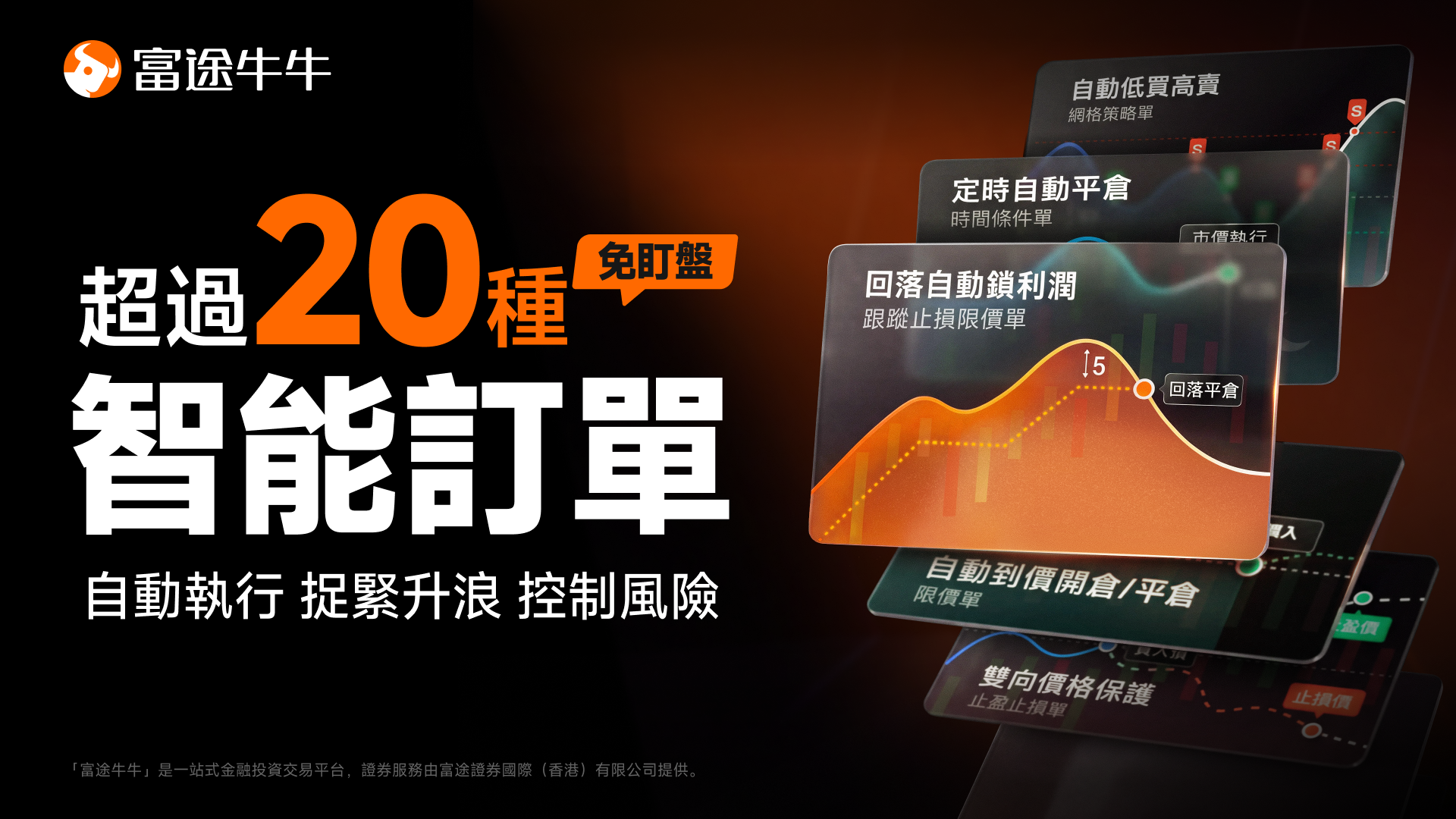
Futubull Smart Orders is an automated order-execution tool provided by Futubull for investors. Investors can pre-set specific trigger conditions—such as price reaching a key level, tracking volatility, or a particular time—and when the market meets these conditions, the system will automatically submit the order().
Futu's smart orders help investors break free from the constraints of prolonged market monitoring, reducing the risk of missing opportunities due to indecision or failing to execute take-profit and stop-loss strategies because of emotional interference.
⚠️ Futu Chief Analyst Feng Wenhui (SFC: BOD280)Tips and Risk Disclosure: Once the trigger condition is met, the system will automatically submit the order to the order book. However, whether the trade ultimately executes successfully depends on market liquidity, order book depth, and price volatility at that moment.
Scenario 1: The stock price is about to break out, but you don't want to chase higher and risk missing the opportunity.

Market signal: The stock price is approaching a key resistance level or a significant support level, with trading volume moderately increasing and technical indicators showing signs of a poised breakout.
Execution blind spot: You only realize it after the stock price has broken sharply higher, leaving you chasing in at a high price; or, while waiting for the price to hit a support level, you get distracted and miss the optimal entry point.
Countermeasures: No need to monitor market conditions for extended periods; proactively set up smart orders to place pending orders in advance.
Futu Smart Orders: Super Chart (One-Click Chart Placement and Price Alert)
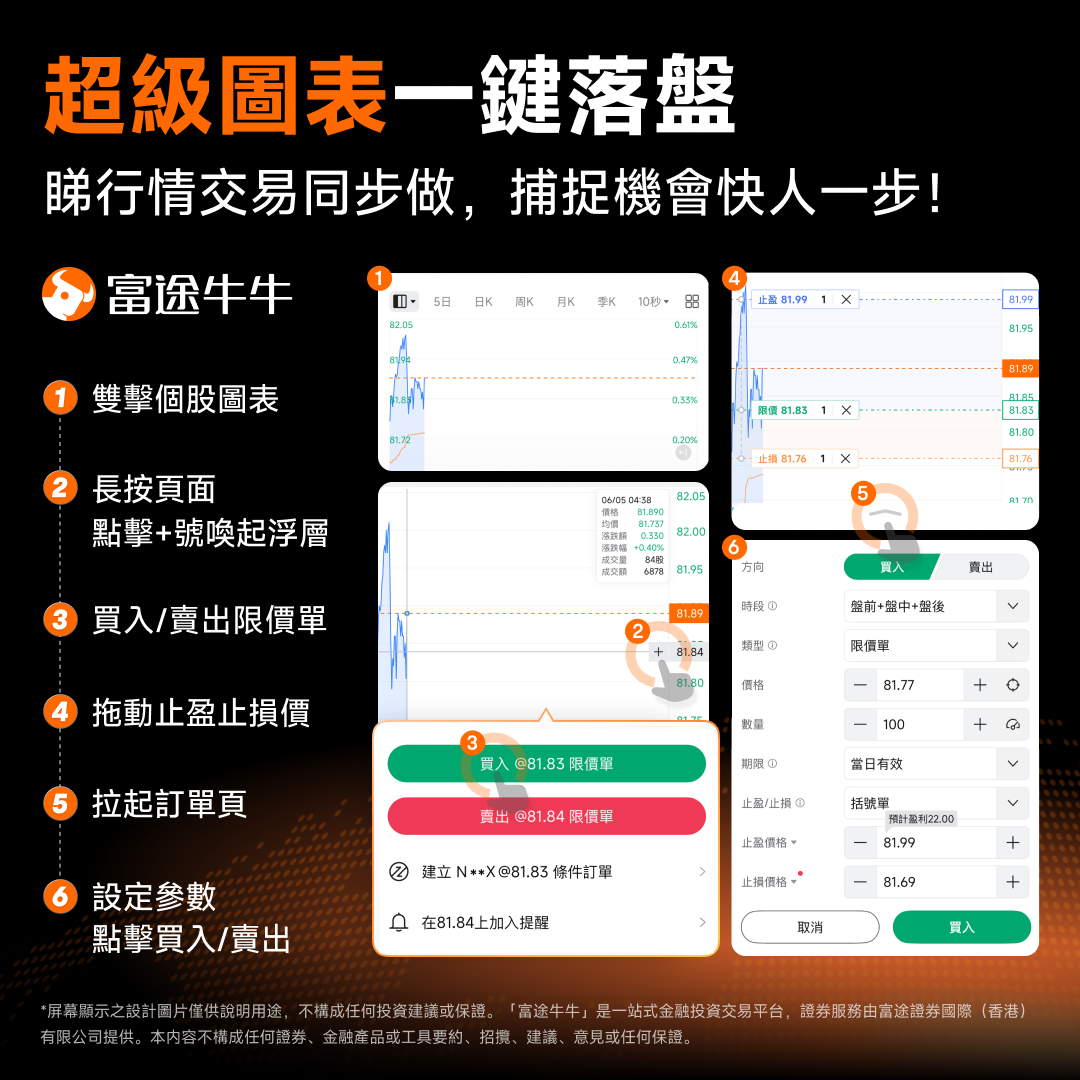
On Futubull's chart, you can simply double-click or long-press the chart to set price alerts or preset conditional orders at key price levels. When the price is reached, you'll receive a push notification for manual confirmation, or the system can automatically place the order.
Futu Smart Orders: Take-profit, stop-loss, and limit orders; open positions with simultaneous take-profit and stop-loss settings.
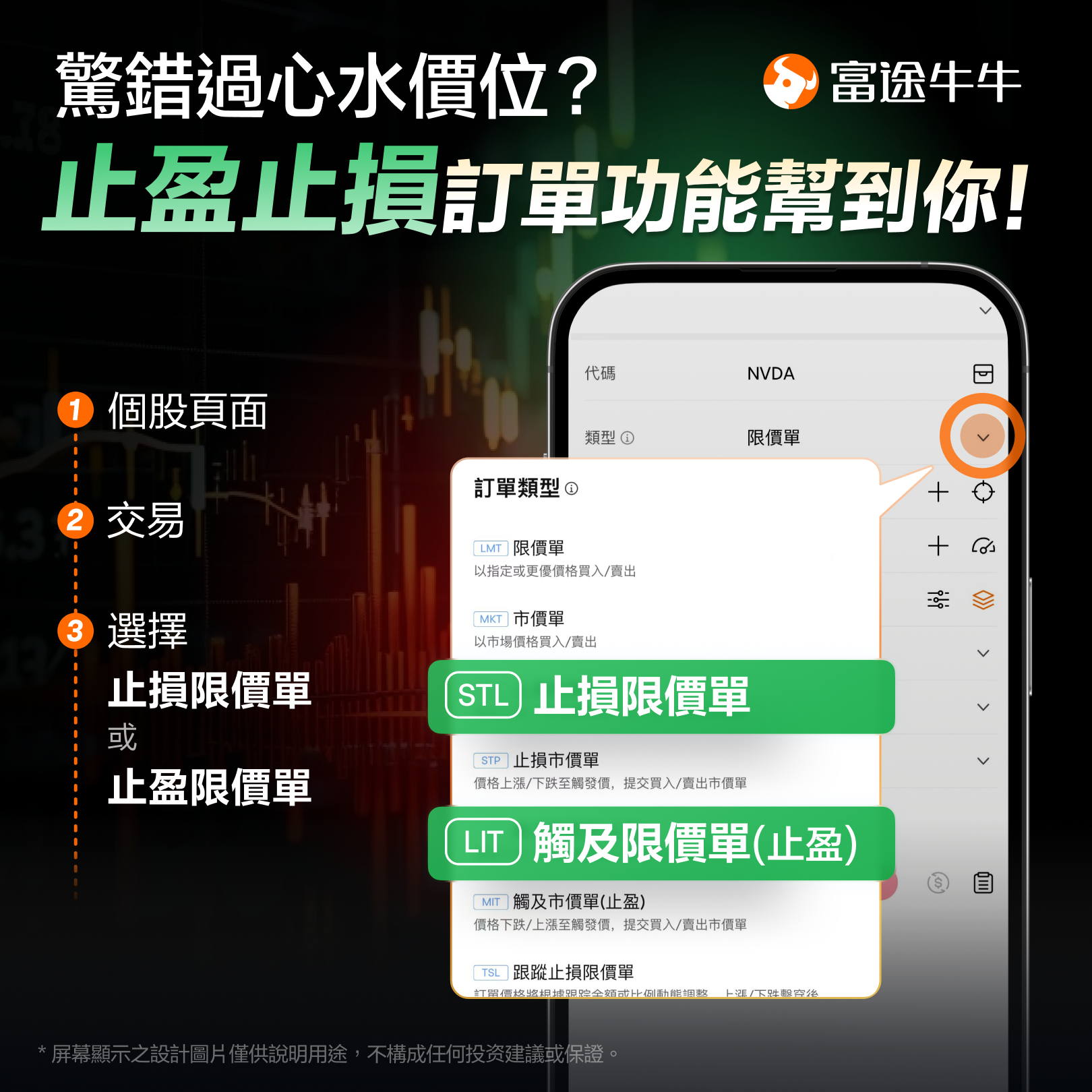
Stop Limit Order (STL): Sets a "trigger price" and a "specified limit price." When the stock price falls to the trigger price, the system automatically submits a limit order to sell, thereby preventing further losses.
Limit‑If‑Touched Order (LIT): When the stock price rises to the target price (trigger price), the system automatically submits a limit sell order to lock in profits.
? Futu stop-limit order example: Suppose you buy NVDA at $100. You can set a Futu stop-limit order with a 30-day validity (or day‑of‑trade validity). Set the trigger price at $95 and the limit sell price at $94.5. When NVDA's share price drops to $95, the system will automatically submit a sell order at a limit price no lower than $94.5, helping you avoid larger losses caused by a sharp price plunge.
Scenario 2: With existing unrealized gains in your position, how can you avoid selling too early or giving back those profits?
Market signal: Short-term gains have exceeded 10%, triggering high-level consolidation, and the direction is becoming unclear.
Execution blind spot: Reluctance to exit the position leads to a gradual unwinding of profits, and in some cases even a shift from profit to loss; after manually selling, the stock price continues to surge, causing you to miss out on subsequent gains.
Trading strategy: Let price action dictate your exit timing—stay in the trade if the trend persists, and automatically close positions when the trend reverses.
Practical Tool: Trailing Stop Limit Order
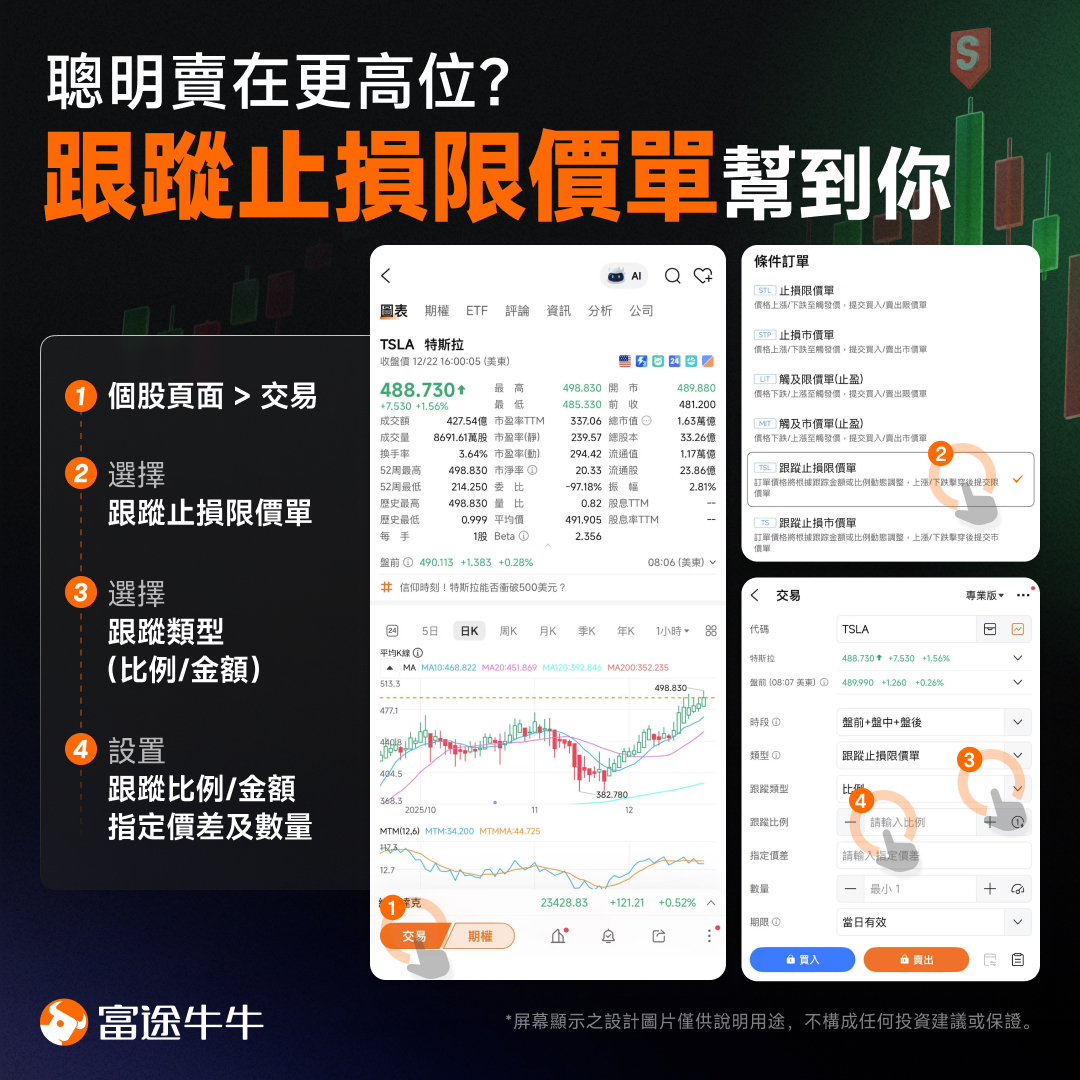
Trailing stop-limit orders are well suited for bull markets or trending moves. Investors can pre‑set a "trailing amount" (e.g., $5) or a "trailing percentage" (e.g., 5%), along with a specified price gap.
How it works: As the stock price continues to rise, the stop-loss price automatically moves upward, locking in accumulated profits. Once the stock price pulls back from its peak by the threshold you've set, the system will automatically trigger a limit sell order.
Trailing Slippage: As the stock price continues to rise, the trigger price automatically adjusts upward in proportion or by a fixed amount, locking in the accumulated unrealized gains.
Price‑Spread Protection: When the stock price falls from its peak and reaches the trigger price, the system automatically deducts the pre‑set "specified spread" and submits a limit sell order, ensuring that even during periods of rapid market volatility, the order maintains sufficient buffer to execute smoothly upon matching.
Advantage: Enables "smart selling at higher levels," ensuring you ride the uptrend to the end and exit automatically when the market reverses!
Scenario 3: The stock is oversold and you're hoping for a rebound, but you're also worried about "catching a falling knife."
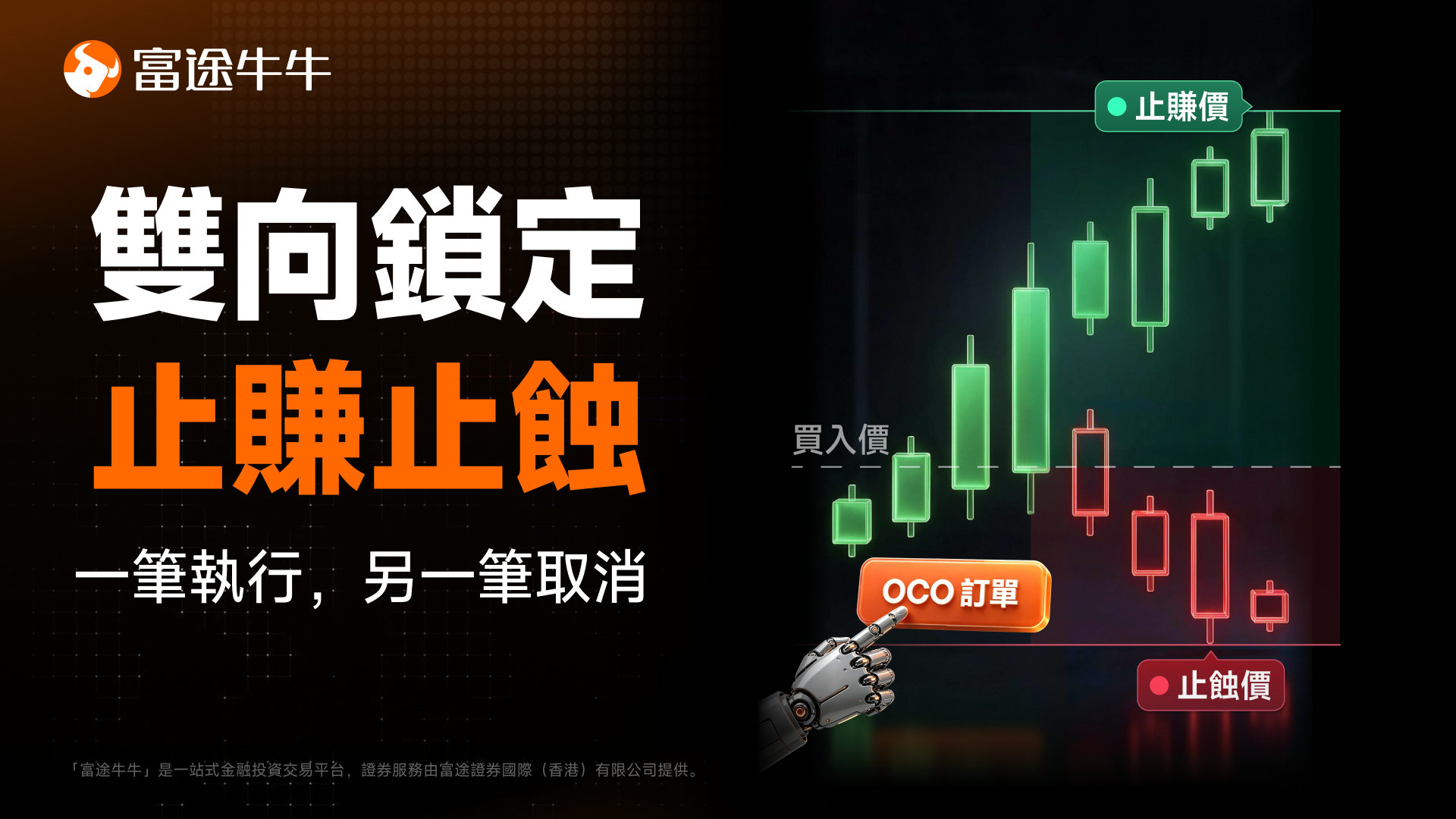
Market Signal: Technical indicators suggest the stock has entered oversold territory and is forming a bottom‑building pattern, but the broader market trend remains unclear.
Execution blind spots: blindly chasing the bottom only to end up getting "scooped out"; or hesitating to enter, missing the chance for a "dead‑cat bounce."
Trading strategy: Employ a two‑way approach for protection. A buy signal is confirmed only when the stock price breaks above a key resistance level; if it falls below a critical support level, the trade is automatically abandoned to avoid "catching a falling knife."
Futu Smart Orders: OCO Orders (One-Cancels-the-Other)
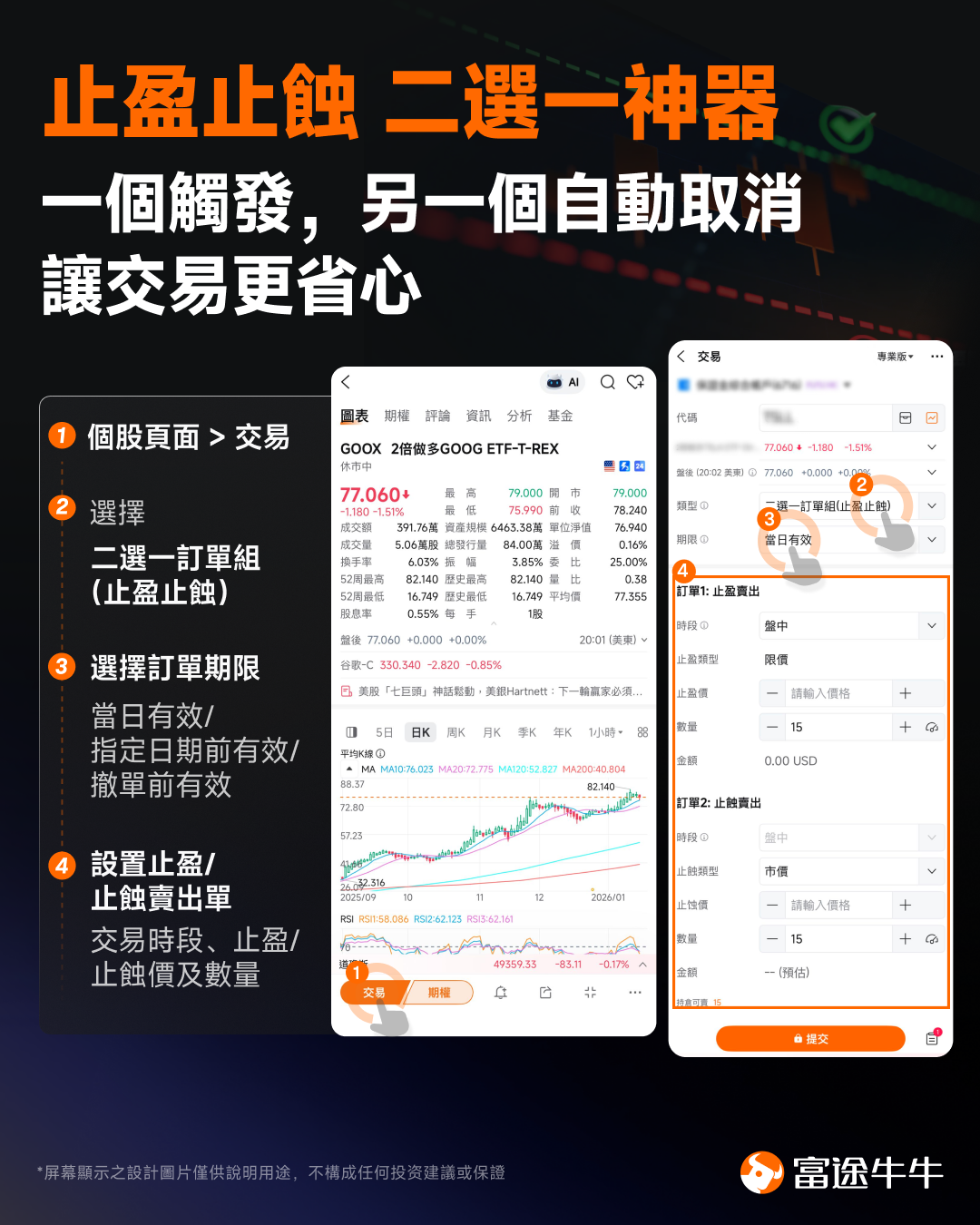
OCO orders are designed for investors who already hold positions, allowing them to place two orders simultaneously—for example, a breakout buy order above the current price and a stop-loss sell order below the current price.
Operational feature: The system monitors two orders around the clock. As soon as one of the orders is successfully triggered and executed, the other order is automatically canceled by the system—no manual cancellation is required.
Real‑time trading defense: A "target‑price take‑profit sell" is preset at the upper level, while a "key‑level stop‑loss sell" is set at the lower level. Whether the market suddenly surges or plunges sharply, this strategy automatically locks in profits or limits losses.
Futu Smart Order: Bracket Order
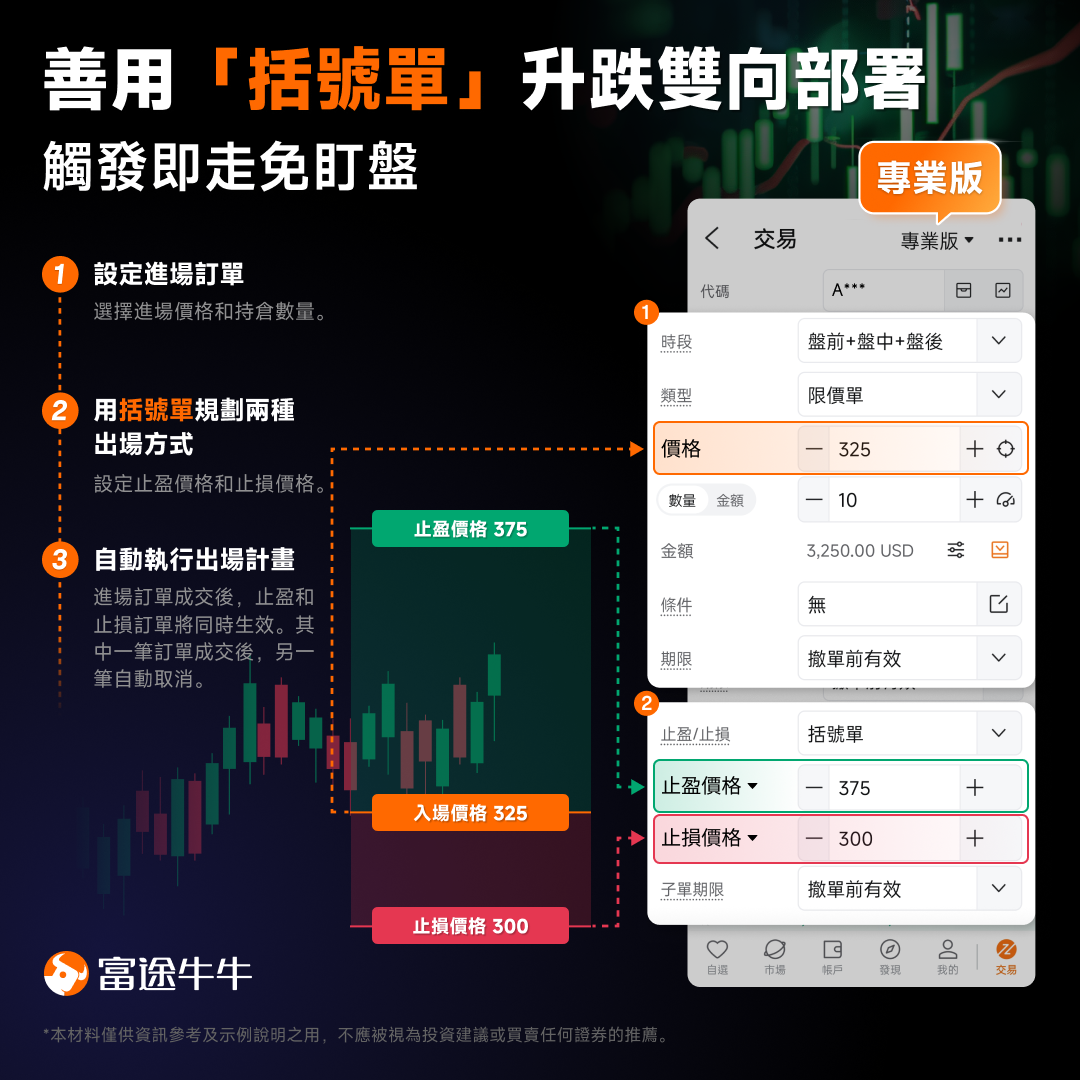
A "parent–child order" structure designed specifically for investors who do not yet hold a position and are preparing to enter the market:
Operating mechanism: Set the parent order (entry price) and the OCO child orders (take-profit and stop-loss prices) in a single step. Before the parent order is executed, the child orders remain inactive; once the parent order is successfully opened, the system automatically places both take-profit and stop-loss orders simultaneously.
Real-World Risk Management: Perfectly addresses the vulnerability of "failing to set a stop-loss after opening a position," ensuring that, from the very first second of entry, both risk and expected return remain firmly under control for every new trade.
Scenario 4: With repeated market ups and downs, how can you automatically "buy low and sell high"?
Market signal: Stock prices are oscillating within a specific range, lacking a clear unidirectional upward or downward trend.
Execution blind spot: Frequently manually "buying high and selling low" not only wastes trading fees but also makes you highly susceptible to being shaken out by market manipulation.
Response strategy: Employ automated strategies to implement grid-based trading, automatically capitalizing on price volatility in both upward and downward moves.
Futu Smart Orders: Grid Trading and Automated Strategies
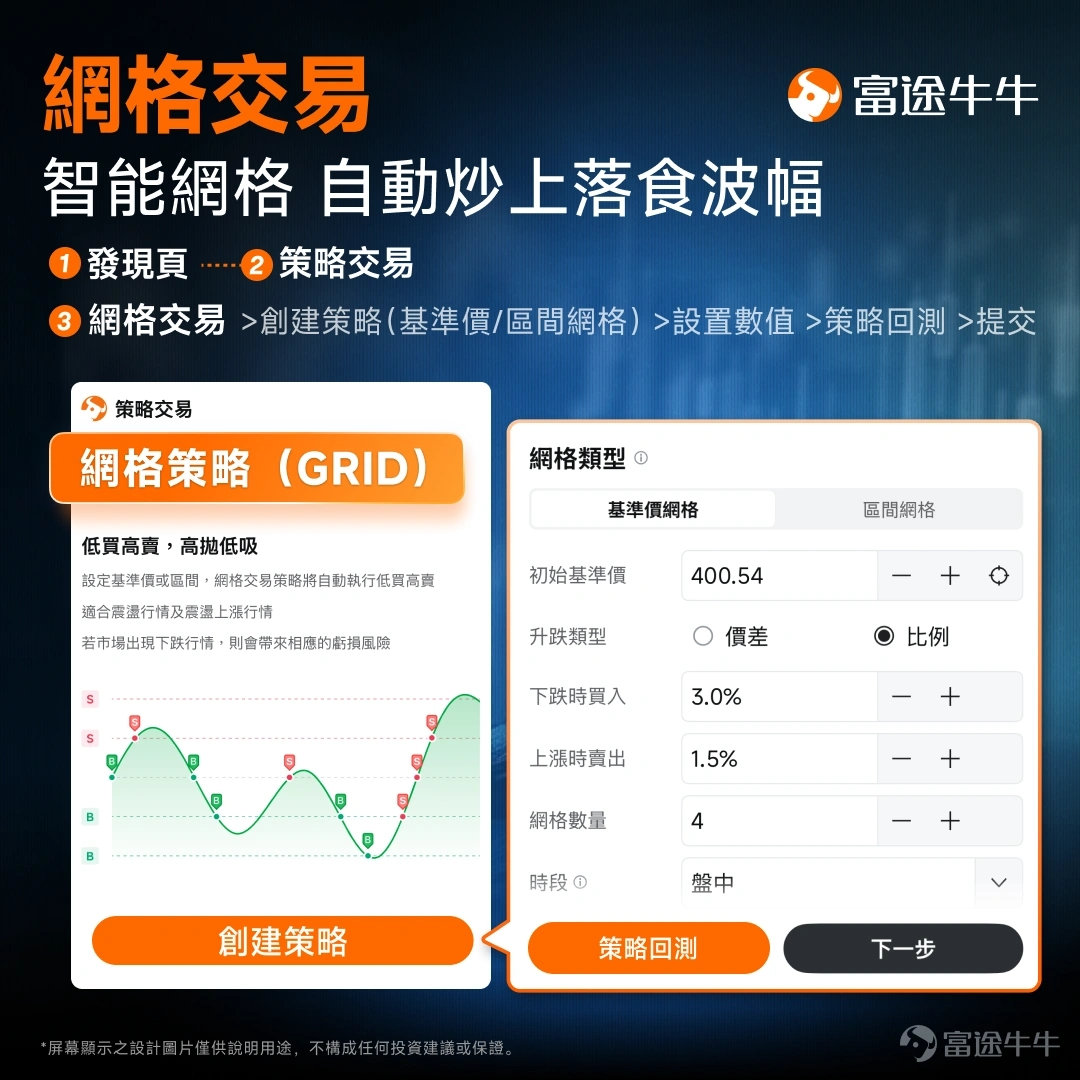
Grid trading is ideally suited to volatile, choppy markets. Investors can pre‑set the upper and lower price limits and the grid spacing; when prices fall, the system automatically buys in batches, and when prices rebound, it sells in batches—operating seamlessly around the clock to capture profits from market swings.
Grid Trading vs. Martingale Strategy Comparison
Trading Strategy | Operating logic | Market performance | Unilateral Downtrend Risk |
Grid Trading | Within the range, implement a "buy low, sell high" strategy in stages, coupled with strict stop-loss settings. | Risk is relatively controllable (with management of wide-range volatility). | Controllable (automatically closes the position at the stop-loss level after a trigger is activated) |
Martingale Strategy | Buy more on dips in proportion, lowering your average cost to accelerate breakeven. | Higher capital efficiency (faster recovery of investment during a rebound) | Relatively high (requires ample funding support and stringent risk controls) |
Scenario 5: U.S. stock earnings season / major conferences—don't want to stay up late watching the market.
Market Signals: Implied volatility tends to surge on the eve of U.S. corporate earnings releases, ahead of Federal Reserve policy meetings, or before speeches by key officials.
Execution blind spot: You neither want to stay up late watching the market nor can you bear the risk of a "gap‑down" opening and being unable to cut your losses, leaving you vulnerable to substantial downside at any moment.
Response strategy: Finalize your decisions before the market opens, input various forecast scenarios into conditional orders, and let the system execute them automatically.
Futu Smart Orders: Conditional Orders (triggered by time or price)
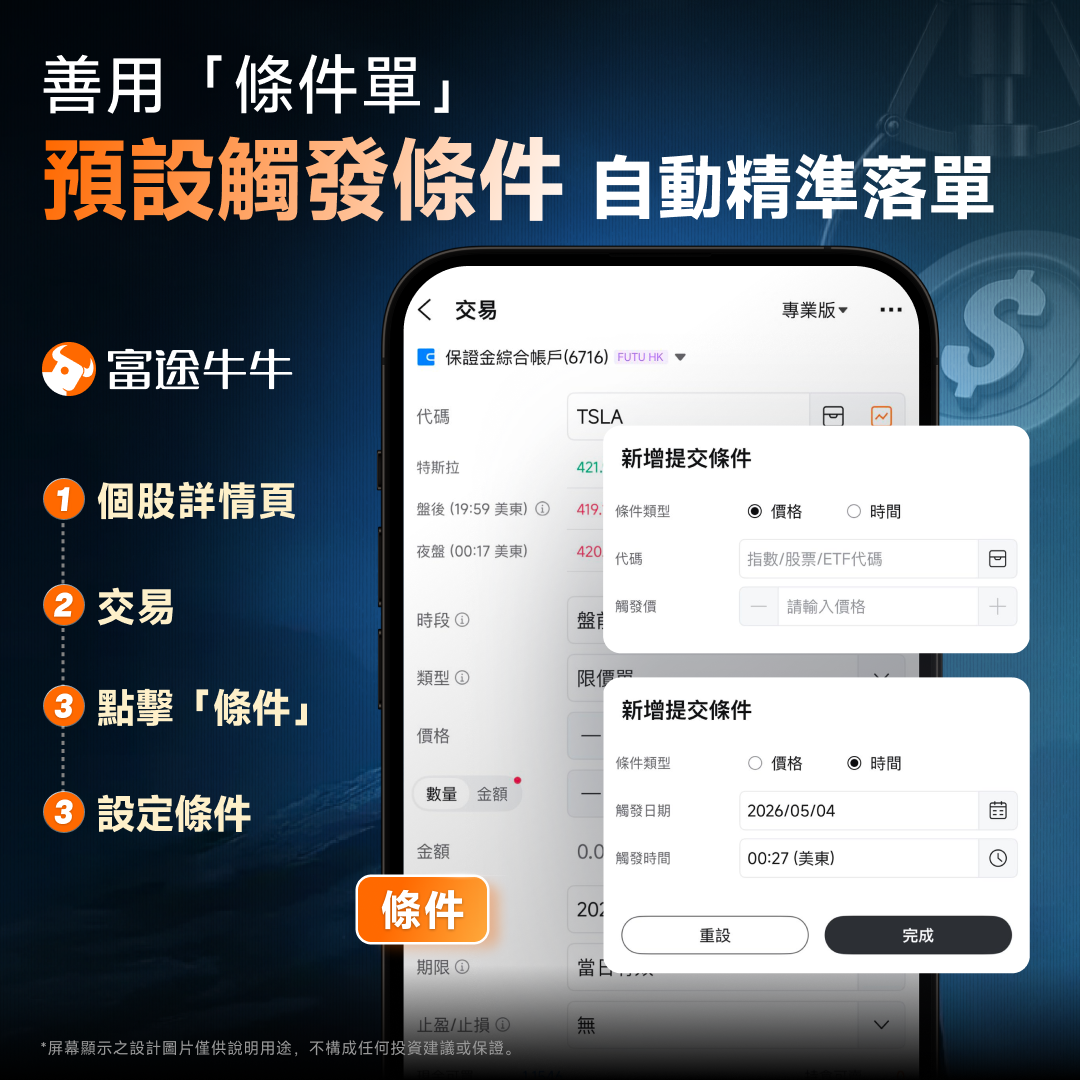
On the Futubull individual stock page, click "Trade"➔"Conditions" to set up flexible criteria as needed:
Price triggers: Automatically buy when earnings exceed expectations and break above a specified resistance level, or automatically cut losses and exit when the price falls below a key support level.
Time-triggered: Automatically close positions at a specified time before market close, thereby avoiding the unknown risks associated with post-market earnings announcements that may cause gaps and lower openings.
Related‑asset triggering (monitoring the underlying stock or index and placing orders for leveraged ETFs or options): This allows investors to use the price of an index or the underlying stock as the trigger. Once the threshold is met, the system automatically submits the corresponding leveraged ETF or options order, enabling an advanced hedging and leverage strategy.
Futu Smart Orders execute automatically 24/7, locking in profits and managing risks.
Stock market volatility is extremely rapid, and relying solely on manual order placement inevitably faces constraints from emotions and time. By leveraging Futu's smart orders and setting take-profit and stop-loss levels in advance, you can let the system objectively execute your trading strategy—no more having to stay up late every day watching the markets!

Comparison of Smart Order Types
Order Type | Operating principle | Applicable Scenarios and Features |
Market order with price bidding | Executed at the prevailing final matched pre-opening price during the pre-market session. | Ensure priority execution at the opening, but the execution price cannot be predetermined. |
Price-Limited Bid Order | Execute a trade at the designated or better price during the pre-opening session. | You can set the buy and sell prices at the open, but if the opening price fails to meet the specified threshold, the trade will not execute. You can precisely control the buy and sell prices at the open, but if the pre‑opening price does not meet the target, the trade will not be executed. |
Stop-Limit Order (STL) | Once the price reaches the trigger price, a limit order at the specified price is automatically placed. | Strong defensive characteristics, enabling control of the downside price; however, in the event of an extreme gap-down opening, there is a risk of failing to execute the trade. |
Trailing Stop-Limit Order | The stop-loss price automatically moves upward in proportion to the highest price or by a fixed amount. | Suitable for locking in floating profits and trend‑following trading, it helps guard against reversal risks while allowing gains to run. |
OCO Order (One of Two) | Place both a take-profit order and a stop-loss order simultaneously; when one is filled, the other is automatically canceled. | Suitable for breakout moves or repeated rallies at higher levels, offering both offensive and defensive advantages without the need to guess the market's next direction. |
Conditional Order | You can set a preset price or a specific time as the trigger condition. | Suitable for earnings seasons or central bank meetings, helping you avoid overnight market exposure and sidestep the risk of opening gaps. |
Grid Trading | Automatically execute "buy low, sell high" within a specified range, capturing market volatility around the clock. | Steady Upside-Downside Market Tool: Paired with strict stop-loss measures, it is well-suited for accumulating returns in volatile markets. |
Martingale Strategy | After each loss, double the bet in hopes of recouping the stake. | High-risk strategy: Compared with grid trading, it is highly prone to liquidation in a one-sided downtrend and should be used with caution. () |
Futubull Stop-Loss Settings and Practical Techniques
Futu Chief Analyst Feng Wenhui (SFC: BOD280)Reminder: When using Futu's smart orders for automated trading, mastering the right stop-loss techniques is crucial:
Stop-loss and take-profit levels should not be set too aggressively: setting the stop-loss too tight can easily trigger prematurely due to normal, minor daily market fluctuations, while setting the take-profit too high may result in it never being reached. It's advisable to base these levels on the security's recent trading range or its key support and resistance levels.
Trailing stop‑loss parameter settings: Set the trailing stop‑loss as a percentage or dollar amount relative to the stock's recent average true range. For highly volatile stocks—such as technology shares or high‑beta stocks—adjust the trailing distance accordingly to be wider.
Before placing your order, carefully verify the parameters: Smart Orders do not consume your buying power until they are triggered (except for certain types). However, before the order officially takes effect, be sure to double-check the trade direction, trigger price, limit price, and order validity period (day‑of‑execution / until cancelled / valid until a specified date) to avoid unnecessary losses caused by incorrect settings.
